AI Agents Need Scheduling Too, and Most Agent Tooling Skips It
Every “agentic AI” pitch in 2026 makes the same implicit assumption: an agent runs right now, because someone or something just triggered it. A chat message came in, a webhook fired, a human clicked a button. The agent reasons, calls a few tools, produces a result, and then stops existing until the next trigger.
That’s fine for a huge share of what agents do today. It’s a bad model for the rest of it. “Check my competitors’ pricing pages every morning and flag changes.” “Reconcile yesterday’s transactions at 2am before the finance team logs on.” “Re-run the ingestion pipeline every 15 minutes and page someone if it falls behind.” None of that waits for a person to show up. Time triggers it, and the infrastructure under time-triggered automation is cron, which predates the agent conversation by decades.
Orchestration frameworks assume something else does the scheduling
Search “AI agent scheduling” right now and most of what comes back is either appointment-booking assistants (an agent that schedules meetings) or agent orchestration frameworks that assume something else (a queue, a cron entry, a Kubernetes CronJob) already exists to wake the agent up. The orchestration layer (LangGraph, CrewAI, whatever’s fashionable this quarter) is extremely good at what happens once the agent is running. It has comparatively little to say about what makes the agent run in the first place, on a schedule, reliably, across however many machines your agents actually live on.
norc was built for the same gap that exists for cron jobs in general. What has changed in 2026 is that the thing waiting on a schedule is increasingly an agent rather than a shell script.
A scheduled agent run is a cron job
It’s tempting to treat “scheduled AI agents” as a new category needing new tooling. Strip away the LLM call in the middle and a scheduled agent run has the same operational shape a cron job has always had:
- A trigger: a time or recurring interval, evaluated on a machine that’s awake to fire it. Standard cron skips a run it missed because the machine was asleep or rebooting, so you need to be able to see that gap instead of having it fail silently.
- A specific place to run, such as a laptop, a home server, or a cloud box. The job has to live on that machine, not just as a description in a dashboard.
- A record of what happened: whether it ran, when, what it returned, whether it failed. An agent that stopped running at 2am and went unnoticed for a week is a worse failure than one that never worked.
- Safe deployment. Pushing a new or changed job shouldn’t mean SSHing in to hand-edit a crontab, and it shouldn’t clobber anything else scheduled on that box.
Every one of those is a solved problem for shell scripts. Almost none of the current agent-framework ecosystem treats it as solved for agents, because most of that ecosystem was built around synchronous, human-triggered runs and bolted scheduling on afterward, if at all.
Where norc already sits in this
norc’s AI schedule generation turns a plain-language request into a validated cron expression. Every job norc manages gets the same run history, failure tracking, and safe-deploy guarantees, whether it runs a backup script, a report generator, or a CLI command that starts an agent.
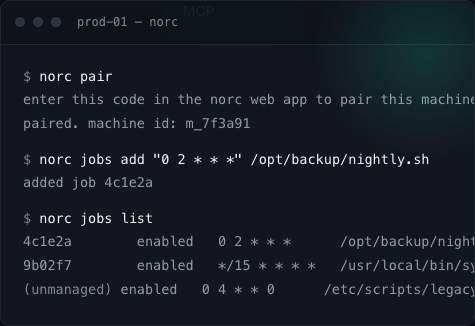
Pair a machine once, local or remote. Nothing inbound is opened and no credentials are handed over. After that you describe schedules in English or edit cron directly, and norc writes the crontab entry, leaves anything it doesn’t manage alone, and syncs state across the devices you check from. When a run fails, norc tells you, so you don’t find out because the report never showed up.
None of that changes if what’s on the other end of 0 2 * * * is agent run --task nightly-triage instead of pg_dump. What runs doesn’t change the scheduling problem. The when has to be trustworthy, and most agent tooling in 2026 still treats that as someone else’s problem.
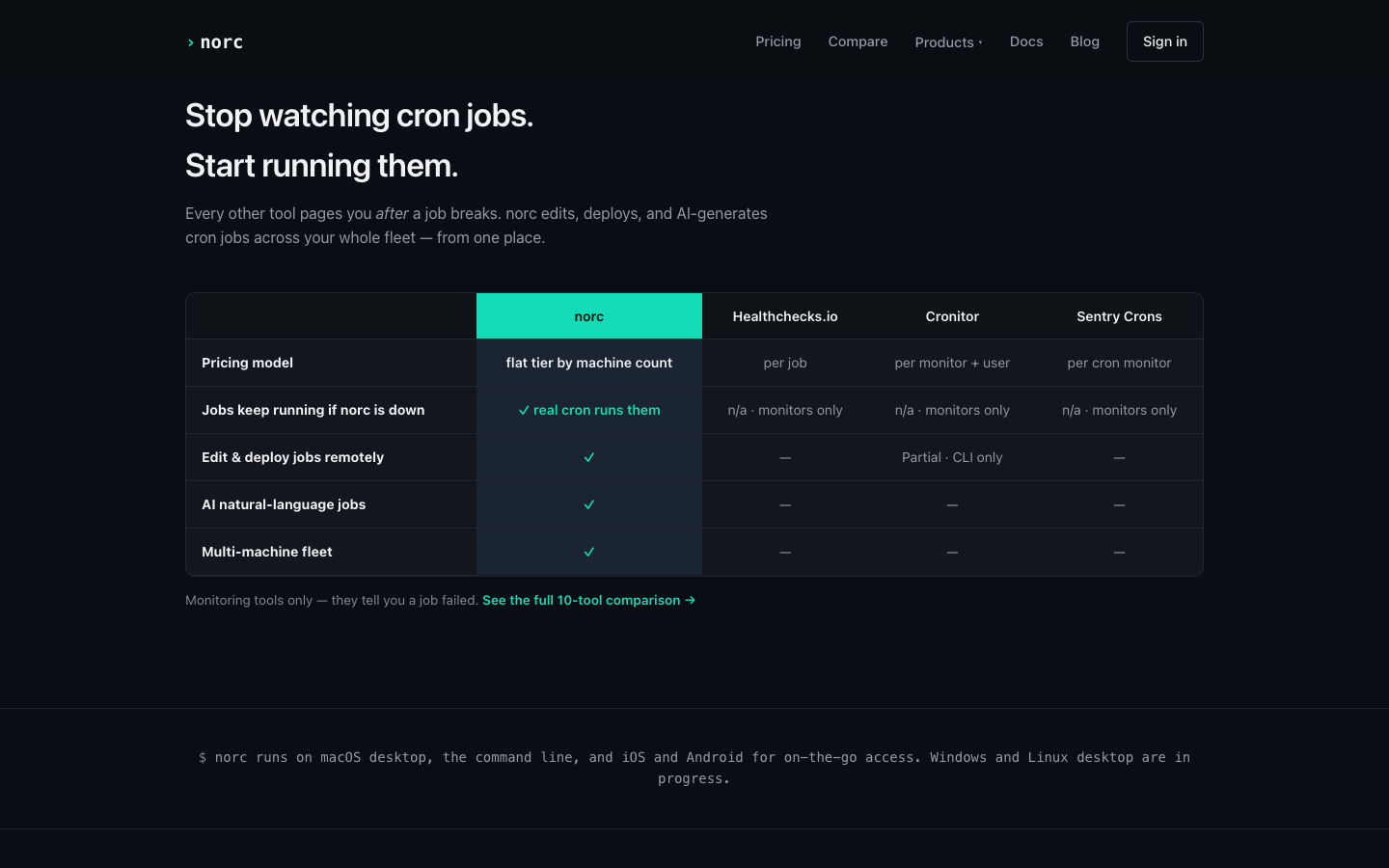
| norc | Healthchecks.io | Cronitor | Sentry Crons | |
|---|---|---|---|---|
| Pricing model | flat tier by machines and jobs | per job | per monitor + user | per cron monitor |
| Jobs keep running if the tool is down | ✓ real cron runs them | n/a · monitors only | n/a · monitors only | n/a · monitors only |
| Edit & deploy jobs remotely | ✓ | No | Partial · CLI only | No |
| AI natural-language jobs | ✓ | No | No | No |
| Multi-machine fleet | ✓ | No | No | No |
The “jobs keep running if the tool is down” row matters more for agents than it did for scripts. A monitoring-only tool can tell you an agent didn’t run, but it can’t make the agent run, because it only ever had a report of the job. Say your agent was supposed to catch a 6am pricing change before markets opened and your scheduling layer is down. An alert that it didn’t happen is a different product from a job that ran anyway, because cron doesn’t need norc to be up to fire.
What to check before you schedule an agent
If you’re putting a recurring trigger on an agent, with norc or anything else, ask these infrastructure questions. They tend to get skipped because the AI part of the project is more interesting:
- If the schedule is wrong by one timezone, will you find out from a log, or from the agent doing the wrong thing at the wrong time with real consequences?
- If the machine running the agent reboots, does the schedule come back, or did it live in a process’s memory?
- If the agent run fails silently (not an error, just no output), does anything notice, or does the schedule keep firing into a void?
- If you need to change the schedule at 11pm because something’s on fire, are you SSHing into a box, or editing it from your phone?
Cron gives you the recurring trigger, and the crontab survives a reboot. Noticing a wrong timezone or a silent failure takes separate monitoring. The fourth is a UI problem, which is the more tractable kind. A smarter agent fixes none of them. Treat “when does this run” as infrastructure.
FAQ
Can norc trigger AI agents directly, or does it just schedule scripts? norc schedules and runs whatever command line you give it: a shell script, a CLI call, or a command that starts an agent run. It doesn’t orchestrate the agent itself. It makes sure the trigger fires reliably on the machine you specify, with a record of what happened.
Is this different from a Kubernetes CronJob or a cloud scheduler? Those work well if your agent already runs in that environment. norc is aimed at the more common reality for smaller teams and solo builders: agents running on a laptop, a home server, or a mix of machines that were never going to be a Kubernetes cluster, with one place to see and manage all of them.
Does the AI scheduling feature require norc to host a model? No. It’s bring-your-own-key. Your prompt goes directly to your own Anthropic or OpenAI key; norc never runs a hosted model in that loop. See the full breakdown of how the generation and validation steps work.
If you’re scheduling agent runs and still doing it with a raw crontab and a prayer, norc gives that setup real run history, safe multi-machine deploys, and an AI-assisted way to write the schedule, and the comparison page shows how it stacks up.